Quick answer
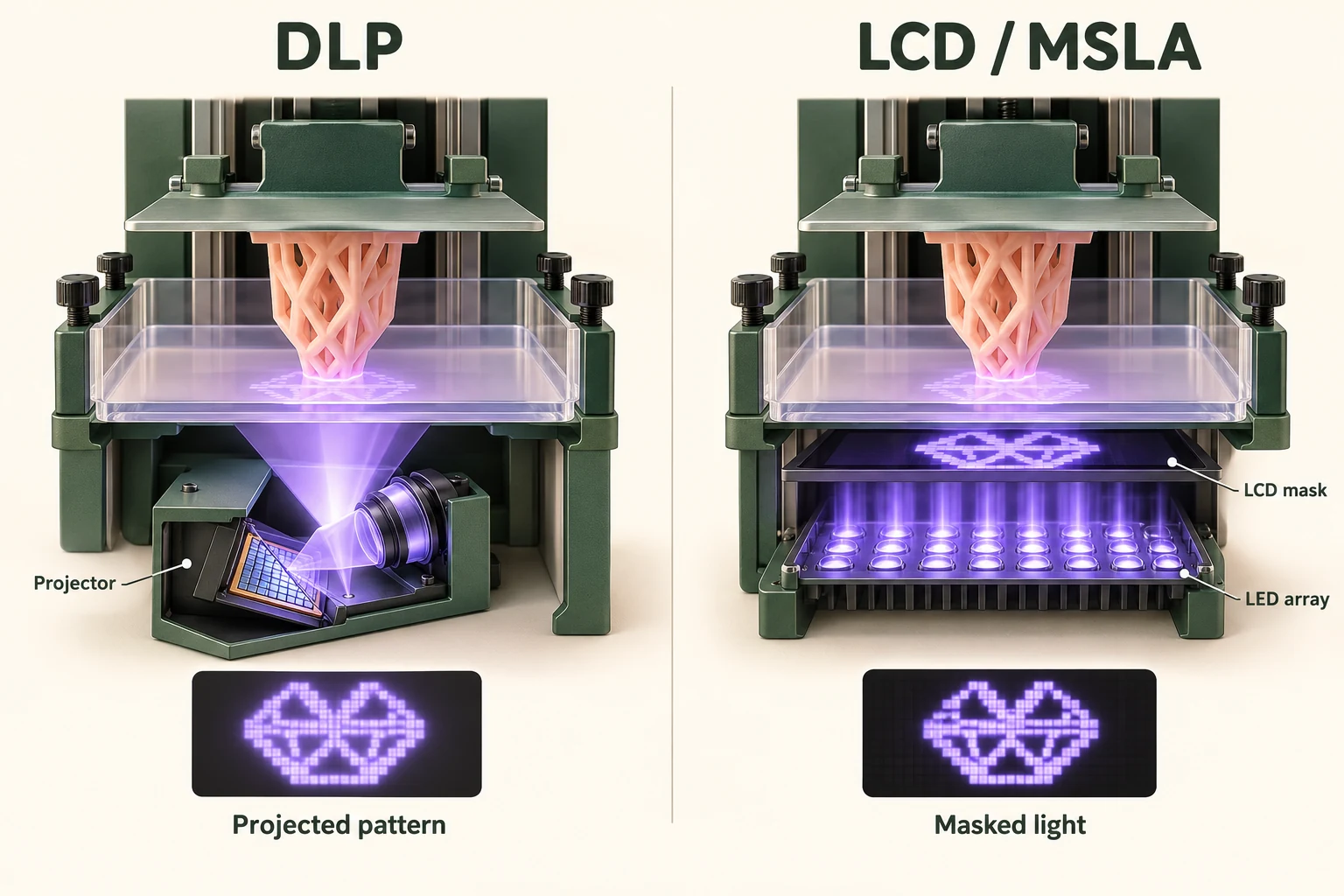
DLP uses projection optics and a micromirror device. LCD resin printers use a screen as a light mask, commonly called MSLA. Both expose layer patterns. Compare a specific printer, compatible resin and finished sample; neither the acronym nor a screen’s K rating identifies a universal winner.
What DLP, LCD and MSLA mean
DLP stands for Digital Light Processing. Its micromirrors control the projected pattern. In LCD/MSLA, an LCD mask selectively passes illumination to the resin. This LCD is the printing mask, not the control touchscreen. TI explains DLP and Prusa explains masked stereolithography.
DLP vs LCD/MSLA comparison
| What to compare | DLP | LCD / MSLA |
|---|---|---|
| Pattern formation | Micromirrors with projection optics | Illumination passing through an LCD mask |
| Layer exposure | A projected layer pattern | A masked layer pattern |
| XY specification | Projected pixel dimensions at the resin | Physical dimensions of the masking pixels |
| Buying evidence | Measure a finished sample | Measure the same sample features |
| Batch comparison | Time the whole preparation-to-finish workflow | Use the same batch and finish requirement |
| Material choice | Check supported resins and profiles | Check supported resins and profiles |
| Upkeep questions | Ask about optical-system service and availability | Also ask about the masking-screen replacement |
| Cost decision | Compare accepted parts and operating costs | Compare accepted parts and operating costs |
Check the product manual for the actual process: ELEGOO’s Saturn 3 Ultra manual, for example, specifies MSLA stereolithography.
Pixel size is more useful than a K label
For an LCD, divide the screen’s printing width by the number of pixels across that width to obtain nominal pixel pitch. Phrozen’s resolution guide explains this relationship. A larger screen with more pixels need not have smaller pixels. Keep X and Y values separate when the manufacturer specifies different pitches.
Treat pitch as an optical specification, not a guaranteed fit tolerance. Ask for a coupon with your smallest text, holes and mating features. Request the intended settings and measurements after finishing. Repeat critical features across the plate to check consistency.
Choose using the job and service plan
- For a few detailed models, compare the finish you can see at the intended scale, cleanup effort and the complete starting purchase.
- For regular small batches, request a timed trial from preparation through finished parts. Ask how many acceptable pieces the trial produced.
- For a part that must fit another object, supply the mating dimensions and acceptance limits. Keep the material and post-processing record with the sample.
- Before buying either system, confirm resin availability, local support, replacement parts and the cost of a realistic interruption.
For an LCD machine, ask specifically who replaces the mask and how the printer is checked afterwards. ELEGOO publishes a model-specific LCD replacement procedure. Ask about service; do not assume a universal screen lifetime or maintenance-free DLP.
Are LCD and MSLA different printing processes?
In these resin-printer comparisons, LCD describes the masking component and MSLA describes masked stereolithography. Read the model specification instead of treating the two labels as opposing material choices. The control-panel screen is a separate component.
Does a higher K number guarantee better detail?
No. First compare the physical printing dimensions and pixel pitch. Then inspect the features you care about on a finished sample. A specification sheet does not establish that your smallest hole will remain open or your lettering will be readable.
Is either one always faster or stronger?
Do not infer either outcome from the exposure system alone. Compare total batch time for the same finished job. For strength, ask for the specific resin’s data and processing requirements, then test the intended use rather than relying on the printer category.
Can I skip washing or curing with LCD printing?
Follow the resin’s prescribed finishing process whichever exposure system is used. Plan protective equipment, cleaning and disposal from the material instructions. Prusa’s resin safety guidance covers exposure precautions; Formlabs’ washing guidance explains why resin-contaminated washing fluid must not enter drains.
Related comparisons and next steps
Compare FDM vs RESIN, SLA vs DLP, FDM vs SLS, SLA vs SLS, SLS vs MJF. Use the printer buying guide to turn the comparison into a shortlist.
Already have a project? Use the print cost calculator for your assumptions or compare buying with outsourcing before investing.
Sources & further reading
We use AI to help prepare our guides. Check the sources and follow the instructions for your specific printer and materials.