A first layer can fail to stick because of the build surface, a mismatched material profile, nozzle height or another setup problem. Check these in a clear order and change one thing at a time. This guide covers filament printers. Calibration methods and cleaning instructions differ between machines and surfaces.
Stop and record the symptom
If loose plastic is being dragged around, stop the print using the supported controls. Take a photo after the machine is safe to approach. Note whether the problem affected the whole layer, one corner or only a small feature. Record the material, build plate and profile. This makes a support request more useful and gives you a baseline for the next attempt.
Check the surface before changing temperatures
Confirm that the build surface is appropriate for your material and seated as instructed. Inspect for visible debris or fingerprints. Clean it using the manufacturer’s instructions for that exact surface. Do not assume a cleaning solvent or adhesive recommended for one plate is suitable for another. Avoid touching the print area again after preparation.
Check that the profile matches the real setup
Read the label on the material spool and compare it with the selected material profile. Confirm the printer, nozzle and build plate settings. If you opened someone else’s project, check whether it changed these selections. Return to an appropriate supported baseline before experimenting with speed, temperature or flow. Record the profile name so you know what was used.
Compare the lines with the right reference
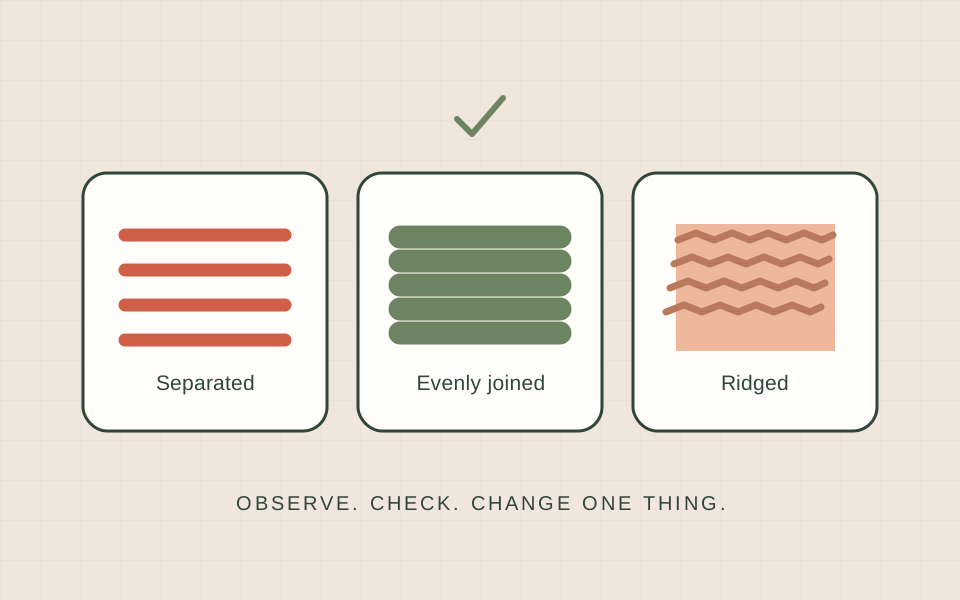
Prusa’s i3 calibration guide shows gaps between rounded lines when the nozzle is too high, and very thin or ridged lines when it is too low. An even joined layer is the target in that guide. These are visual clues, not universal adjustment values. Some printers set nozzle height automatically; follow the calibration procedure for your own model rather than copying another printer’s offset.
| What you observe | A useful next check |
|---|---|
| Round strands with spaces between them | Consult your printer’s first-layer calibration reference. |
| Very thin lines or raised ridges | Stop and check the manufacturer’s nozzle-height guidance. |
| Failure in one repeated area | Inspect the surface, seating and the machine’s bed-level procedure. |
| Only a tiny feature comes loose | Review model orientation and any supported adhesion options. |
Run one small, controlled check
Use the manufacturer’s recommended calibration or test procedure. Change only the issue you identified, then compare the same small test with the previous result. If you replace the material, model and profile together, you cannot tell which change helped. Save both photos and notes, including a failed attempt; they are evidence for the next decision.
Know when to ask for support
Contact the manufacturer or service provider if calibration fails, the nozzle contacts the plate, or the same issue persists after the documented checks. Share the exact printer model, material, plate, profile, a clear photo and a short description of what you tried. Avoid dismantling a hotend or changing firmware just to solve an unclear first-layer symptom. Once the small test is consistent, return to your first print and keep the successful settings as a reference.
Sources & further reading
We use AI to help prepare our guides. Check the sources and follow the instructions for your specific printer and materials.